
Deploying Agent Network Ingress and Egress Managed Omni Gateways
An agent network deployment requires at least one managed Omni Gateway. A single gateway can handle both ingress and egress traffic, which is the recommended configuration. One gateway simplifies operations with unified policy enforcement, centralized observability, and a single deployment to manage and scale. This configuration also reduces the cost of running multiple gateways.
That gateway manages ingress traffic in front of broker and API endpoints and enforces policies on traffic entering the network. The same gateway manages egress traffic on outbound paths from brokers and agents to external agents and services, where it enforces policies, manages connections, and emits telemetry.
If you need separate control of inbound and outbound traffic, you can deploy separate ingress and egress gateways in a private or shared space. The only functional difference is that the egress gateway doesn’t have a public endpoint. Only clients in the same space as the egress gateway can send requests to it. Traffic leaving the private or shared space to external services passes through the egress gateway.
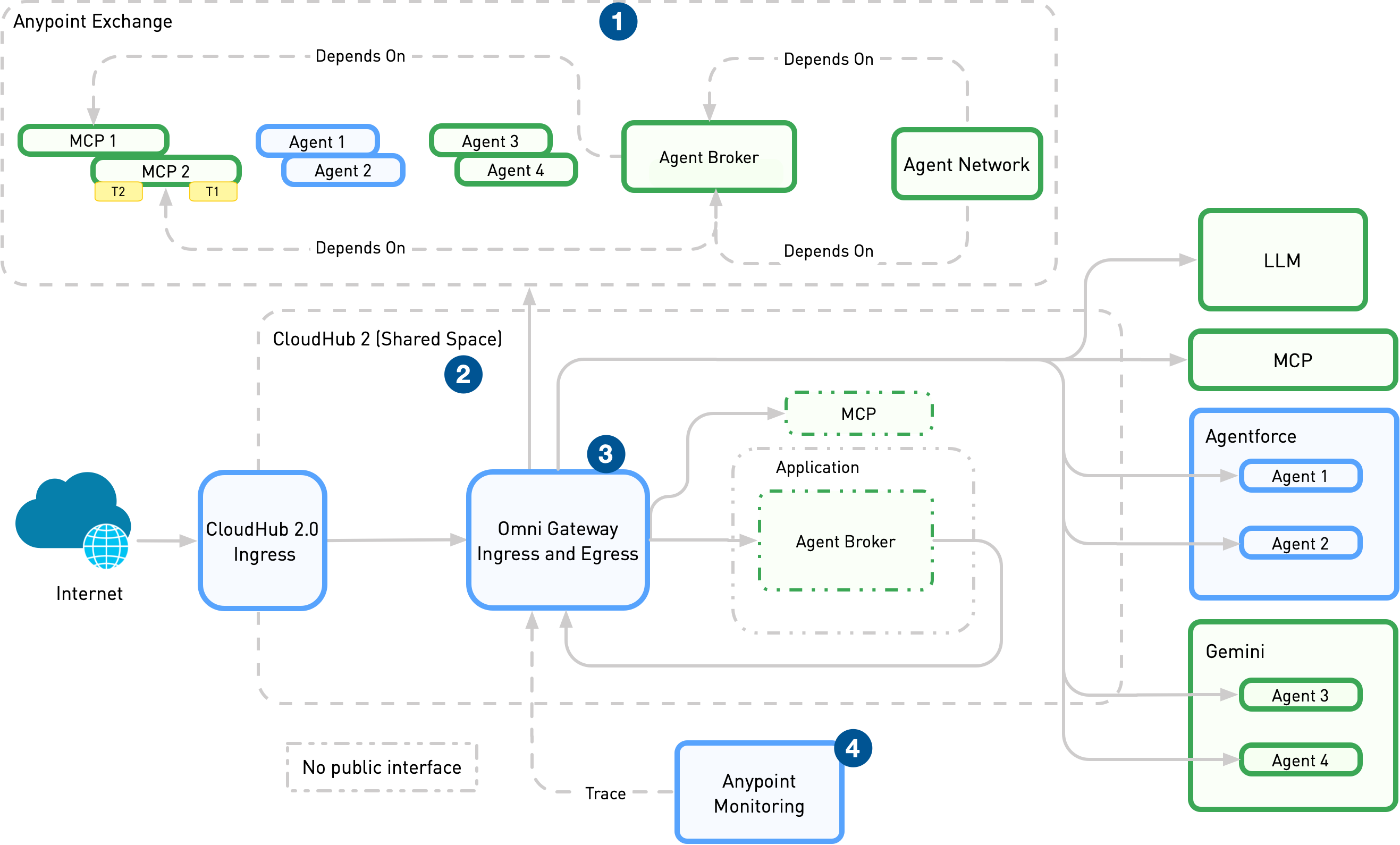
| For a more detailed description of this architecture diagram, see Agent Network Architecture. |
Deploy Ingress and Egress Managed Omni Gateways
The easiest way to deploy your Agent Network ingress and egress Omni Gateways is by using Anypoint Code Builder or Anypoint Command Line Interface (CLI):
To manually deploy both ingress and egress managed Omni Gateways using the Runtime Manager UI, see Deploy a Managed Omni Gateway.
For ingress gateways, configure a Public endpoint in the advanced options Ingress tab. For egress gateways, verify that there’s no Public endpoint configured. To prevent confusion, give a descriptive name defining the gateway as either ingress or egress.
Apply Inbound and Outbound Policies
Inbound policies are policies that are enforced on all traffic accessing an instance’s endpoint. Outbound policies are policies that are enforced on all traffic accessing a specific URL and are only applied to that URL. For example, for an agent instance that has multiple upstreams, an inbound client ID enforcement policy enforces client ID verification for all traffic accessing the agent instance. However, an outbound policy might be applied to only one of the instance’s upstream.